LiveKit docs › Building Frontends › Authentication › Token server
---
# Token server
> Get started quickly with LiveKit Cloud's token server.
> ⚠️ **Development only**
>
> The token server is for development and testing only. It's not suitable for production, since any frontend app can request a token with any permissions and no restrictions.
## Overview
LiveKit Cloud's token server generates tokens for you with no backend code required. When you're ready for production, migrate to [endpoint token generation](https://docs.livekit.io/frontends/build/authentication/endpoint.md).
> ℹ️ **Sandbox deprecation**
>
> LiveKit Sandbox is deprecated, but the token server remains available as a standalone project setting. Some SDK APIs still use `sandboxTokenServer` or `SandboxTokenSource` because the token server was originally part of Sandbox.
## Enable the token server
1. Open your project's [Settings](https://cloud.livekit.io/projects/p_/settings/project) page in LiveKit Cloud.
2. Find the **Token server** toggle and switch it on. LiveKit Cloud automatically creates a token server for your project.
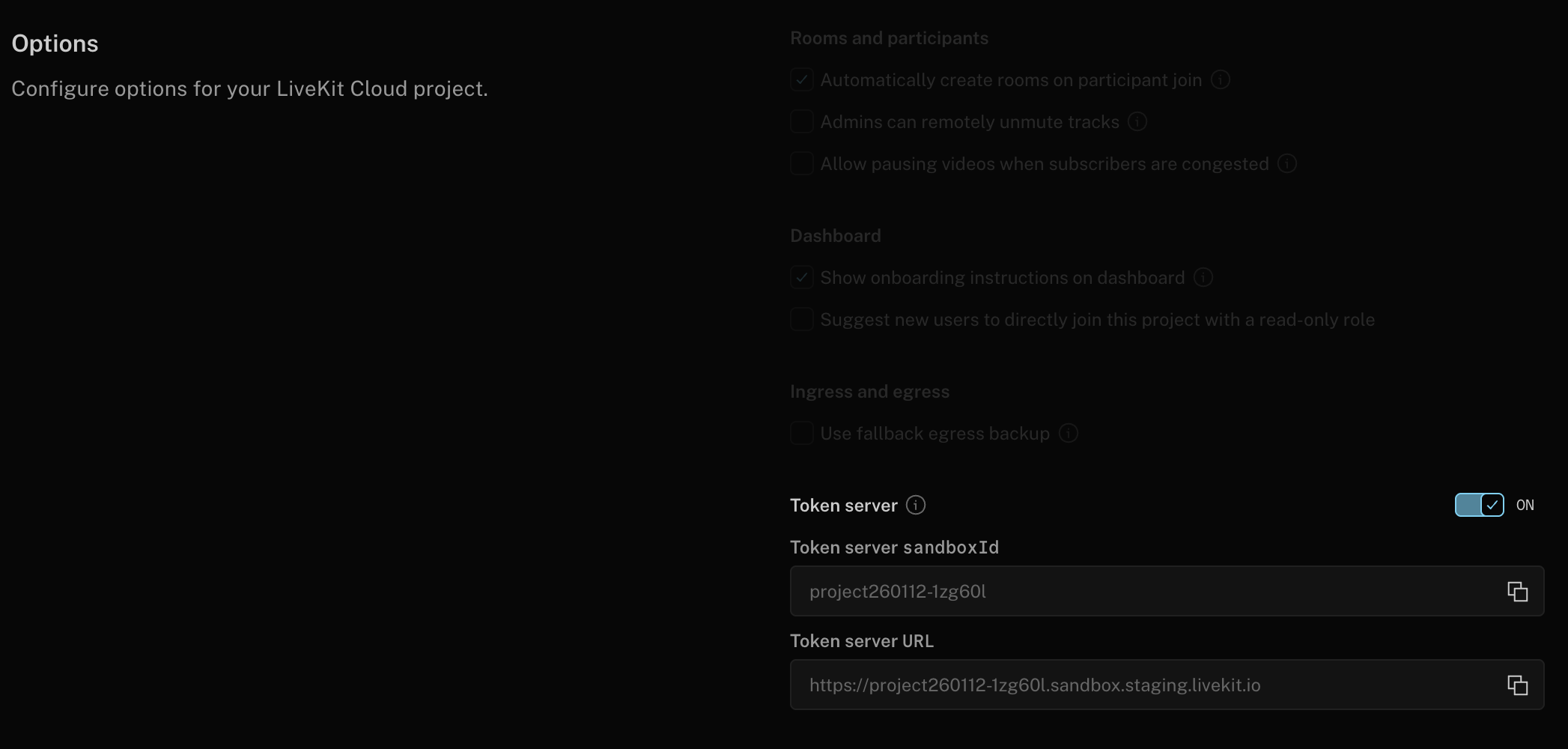
1. Copy the **sandbox ID** displayed below the toggle. Use this value in your frontend code.
## Use a token server TokenSource
Configure a token server `TokenSource` in your application with your sandbox ID:
> 💡 **Agent dispatch**
>
> The token server accepts `agent_name` in token requests. When using Session APIs, you can provide the agent name at runtime, and it's automatically included in token requests. See the [Authentication overview](https://docs.livekit.io/frontends/build/authentication.md) for more information.
**JavaScript**:
```typescript
import { Room, TokenSource } from 'livekit-client';
// Create the TokenSource
const tokenSource = TokenSource.sandboxTokenServer("%{firstSandboxTokenServerName}%");
// Fetch a token (cached and automatically refreshed as needed)
// For agent applications, include agentName in the fetch options
const { serverUrl, participantToken } = await tokenSource.fetch({
roomName: "room name to join",
agentName: "my-agent-name" // Optional: for agent dispatch
});
// Use the generated token to connect to a room
const room = new Room();
room.connect(serverUrl, participantToken);
```
---
**React**:
```typescript
import { TokenSource } from 'livekit-client';
import { useSession, SessionProvider } from '@livekit/components-react';
// Create the TokenSource
const tokenSource = TokenSource.sandboxTokenServer("%{firstSandboxTokenServerName}%");
export const MyPage = () => {
const session = useSession(tokenSource, {
roomName: "room name to join",
agentName: "my-agent-name" // Optional: for agent dispatch
});
// Start the session when the component mounts, and end the session when the component unmounts
useEffect(() => {
session.start();
return () => {
session.end();
};
}, []);
return (
)
}
export const MyComponent = () => {
// Access the session available via the context to build your app
// ie, show a list of all camera tracks:
const cameraTracks = useTracks([Track.Source.Camera], {onlySubscribed: true});
return (
<>
{cameraTracks.map((trackReference) => {
return (
)
})}
)
}
```
---
**Swift**:
```swift
import LiveKitComponents
@main
struct SessionApp: App {
let session = Session.withAgent("my-agent", tokenSource: SandboxTokenSource(id: "%{firstSandboxTokenServerName}%"))
var body: some Scene {
WindowGroup {
ContentView()
.environmentObject(session)
.alert(session.error?.localizedDescription ?? "Error", isPresented: .constant(session.error != nil)) {
Button(action: session.dismissError) { Text("OK") }
}
.alert(session.agent.error?.localizedDescription ?? "Error", isPresented: .constant(session.agent.error != nil)) {
AsyncButton(action: session.end) { Text("OK") }
}
}
}
}
struct ContentView: View {
@EnvironmentObject var session: Session
var body: some View {
if session.isConnected {
AsyncButton(action: session.end) {
Text("Disconnect")
}
Text(String(describing: session.agent.agentState))
} else {
AsyncButton(action: session.start) {
Text("Connect")
}
}
}
}
```
---
**Android**:
```kotlin
val tokenSource = remember {
TokenSource.fromSandboxTokenServer("%{firstSandboxTokenServerName}%").cached()
}
val session = rememberSession(
tokenSource = tokenSource,
options = SessionOptions(
tokenRequestOptions = TokenRequestOptions(agentName = "my-agent-name") // Optional: for agent dispatch
)
)
Column {
SessionScope(session = session) { session ->
val coroutineScope = rememberCoroutineScope()
var shouldConnect by remember { mutableStateOf(false) }
LaunchedEffect(shouldConnect) {
if (shouldConnect) {
val result = session.start()
// Handle if the session fails to connect.
if (result.isFailure) {
Toast.makeText(context, "Error connecting to the session.", Toast.LENGTH_SHORT).show()
shouldConnect = false
}
} else {
session.end()
}
}
Button(onClick = { shouldConnect = !shouldConnect }) {
Text(
if (shouldConnect) {
"Disconnect"
} else {
"Connect"
}
)
}
}
}
```
---
**Flutter**:
```dart
import 'package:livekit_client/livekit_client.dart' as sdk;
final tokenSource = sdk.SandboxTokenSource(sandboxId: "%{firstSandboxTokenServerName}%");
final session = sdk.Session.withAgent("my-agent-name", tokenSource: tokenSource);
/* ... */
await session.start();
// Use session to further build out your application.
```
---
**React Native**:
```typescript
import { TokenSource } from 'livekit-client';
import { useSession, SessionProvider } from '@livekit/components-react';
// Create the TokenSource
const tokenSource = TokenSource.sandboxTokenServer("%{firstSandboxTokenServerName}%");
export const MyPage = () => {
const session = useSession(tokenSource, {
roomName: "room name to join",
agentName: "my-agent-name" // Optional: for agent dispatch
});
// Start the session when the component mounts, and end the session when the component unmounts
useEffect(() => {
session.start();
return () => {
session.end();
};
}, []);
return (
{/* render the rest of your application here */}
)
}
```
---
This document was rendered at 2026-06-07T11:35:37.999Z.
For the latest version of this document, see [https://docs.livekit.io/frontends/build/authentication/sandbox-token-server.md](https://docs.livekit.io/frontends/build/authentication/sandbox-token-server.md).
To explore all LiveKit documentation, see [llms.txt](https://docs.livekit.io/llms.txt).