Overview
LiveKit telephony lets you build AI-powered voice apps that handle inbound and outbound calls. It includes LiveKit Phone Numbers for purchasing and managing phone numbers, and supports integration with third-party SIP providers. Together, these features bridge traditional telephony with LiveKit's modern, realtime communication platform.
LiveKit Phone Numbers
Purchase and manage phone numbers for your telephony apps directly through LiveKit. LiveKit Phone Numbers provides access to local and toll-free numbers in the United States, and is available in LiveKit Cloud. To learn more, see LiveKit Phone Numbers.
Telephony components
LiveKit telephony extends the core primitives—participant, room, and track—to include two additional components specific to telephony: trunks and dispatch rules. These components are represented by objects created through the API and control how calls are handled.
Session Initiation Protocol (SIP) participant
A SIP participant is a LiveKit participant that represents a caller or callee in a call. SIP participants are the same as any other participant and are managed using the participant APIs. They have the same attributes and metadata as other participants, and have additional SIP specific attributes.
For inbound calls, a SIP participant is automatically created for each caller. For outbound calls, you need to explicitly create a SIP participant using the CreateSIPParticipant API to make a call.
Trunks
LiveKit trunks bridge your third-party SIP provider and LiveKit. To use LiveKit, you must configure your SIP provider's trunking service to work with LiveKit. The setup depends on your use case—whether you're handling incoming calls, making outgoing calls, or both.
- Inbound trunks handle incoming calls and can be restricted to specific IP addresses or phone numbers.
- Outbound trunks are used to place outgoing calls.
Trunks can be region restricted to meet local telephony regulations.
The same SIP provider trunk can be associated with both an inbound and an outbound trunk in LiveKit. You only need to create an inbound or outbound trunk once.
Dispatch rules
Dispatch Rules are associated with a specific trunk and control how inbound calls are dispatched to LiveKit rooms. All callers can be placed in the same room or different rooms based on the dispatch rules. Multiple dispatch rules can be associated with the same trunk as long as each rule has a different pin.
Dispatch rules can also be used to add custom participant attributes to SIP participants.
LiveKit supported SIP features
LiveKit telephony supports the following SIP features and protocols:
| SIP Feature | Status | Notes |
|---|---|---|
| SIP over UDP | ✅ Supported | Transport protocol for SIP signaling. |
| SIP over TCP | ✅ Supported | Transport protocol for SIP signaling. |
| SIP over TLS | ✅ Supported | Transport protocol for SIP signaling. Does not support REFER. |
| SIP Registration (REGISTER) | ❌ Not Supported | |
| SIPRECT (SRS) | ❌ Not Supported | |
| DTMF (RFC 2833 / RFC 4733) | ✅ Supported | To learn more, see DTMF. |
| Video over SIP | ❌ Not Supported | |
| Call Transfer (cold transfer) (REFER) | ✅ Supported | To learn more, see Call forwarding. |
| Warm Transfer | ✅ Supported | To learn more, see Agent-assisted transfer. |
| Caller ID (From header) | ✅ Supported | |
| SIP OPTIONS | ✅ Supported | |
| Realtime Transfer Protocol (RTP) | ✅ Supported | Network protocol for delivering audio and video media. |
| Secure RTP (SRTP) | ✅ Supported | Network protocol for delivering encrypted audio and video media. To learn more, see Secure trunking. |
Key concepts
Understand these core concepts to build effective telephony applications with LiveKit.
Features
LiveKit telephony includes support for DTMF, call transfers, secure trunking, HD voice, region pinning, and noise cancellation. These features enable you to build production-ready telephony applications with advanced capabilities.
Features overview
Learn about the telephony features available in LiveKit.
Accepting calls
Handle inbound calls by setting up inbound trunks, configuring dispatch rules, and integrating with your SIP provider. Inbound calls automatically create SIP participants that join LiveKit rooms.
Accepting calls overview
Learn how to accept and handle inbound phone calls.
Making calls
Place outbound calls by creating outbound trunks and using the SIP API to create SIP participants. Outbound calls enable your applications to initiate phone calls programmatically.
Making calls overview
Learn how to make outbound phone calls with LiveKit.
Service architecture
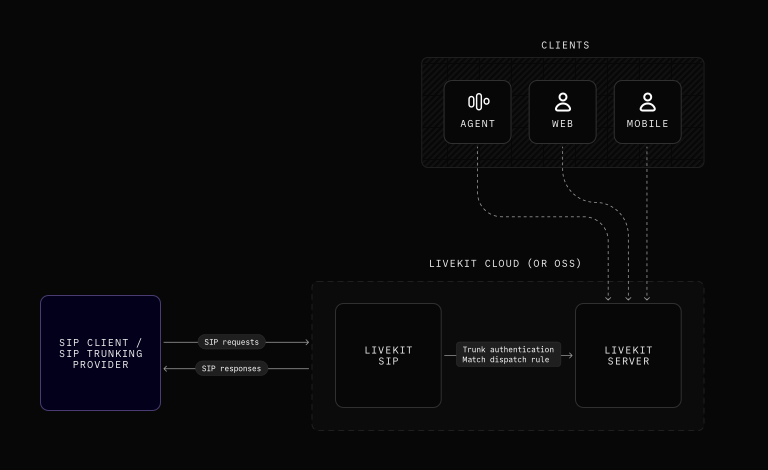
LiveKit telephony relies on the following services:
- A Direct Inward Dialing (DID) number provided by LiveKit Phone Numbers or a third-party SIP provider. LiveKit supports most SIP providers out of the box.
- LiveKit server (part of LiveKit Cloud) for API requests, managing and verifying SIP trunks and dispatch rules, and creating participants and rooms for calls.
- LiveKit SIP (part of LiveKit Cloud) to respond to SIP requests, mediate trunk authentication, and match dispatch rules.
If you use LiveKit Cloud, LiveKit SIP is ready to use with your project without any additional configuration. If you're self hosting LiveKit, the SIP service needs to be deployed separately. To learn more about self hosting, see SIP server.
Using LiveKit SIP
The LiveKit SIP SDK is available in multiple languages. To learn more, see SIP API.
LiveKit SIP has been tested with the following SIP providers:
LiveKit SIP is designed to work with all SIP providers. However, compatibility testing is limited to the providers below.
Noise cancellation for calls
Krisp noise cancellation uses AI models to identify and remove background noise in realtime. This improves the quality of calls that occur in noisy environments. For LiveKit telephony apps that use agents, noise cancellation improves the quality and clarity of user speech for turn detection, transcriptions, and recordings.
For incoming calls, see the inbound trunks documentation for the krisp_enabled attribute. For outgoing calls, see the CreateSIPParticipant documentation for the krisp_enabled attribute used during outbound call creation.
Getting started
See the following guides to get started with LiveKit telephony:
SIP primer
Learn how SIP integrates with LiveKit to enable seamless call routing between telephony systems and LiveKit rooms.
LiveKit Phone Numbers
Purchase a phone number through LiveKit Phone Numbers for inbound calls.
SIP trunk setup
Purchase a phone number and configure your SIP trunking provider for LiveKit.
Accepting inbound calls
Learn how to accept inbound calls with LiveKit.
Making outbound calls
Learn how to make outbound calls with LiveKit.
Voice AI quickstart
Create an AI agent integrated with telephony.
Recipes
The following recipes are particularly helpful to learn more about building telephony-based voice AI apps.