Inbound call workflow
When an inbound call is received, LiveKit SIP receives a text-based INVITE request. This can come from either your SIP trunking provider or through a LiveKit phone number. For third-party SIP providers, the SIP service first verifies authorization to use the trunk. This can vary based on the LiveKit trunk configuration. If you're using LiveKit Phone Numbers, no inbound trunk configuration or verification is required.
The SIP service then looks for a matching dispatch rule. If there's a matching dispatch rule, a SIP participant is created for the caller and added to a LiveKit room. Depending on the dispatch rule, other participants (for example, a voice agent or other users) might also join the room.
The following diagram shows the inbound call workflow.
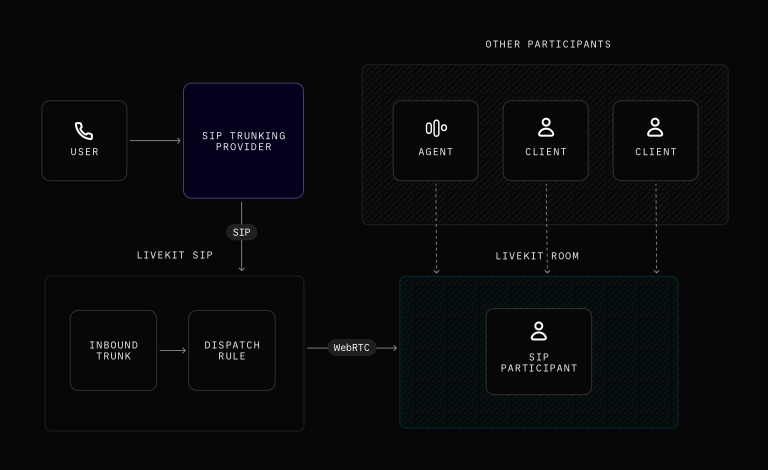
User dials the SIP trunking provider phone number or a LiveKit Phone Number.
LiveKit SIP receives the INVITE request:
- For third-party SIP providers: Authenticates trunk credentials and checks if the call is allowed based on the inbound trunk configuration.
- For LiveKit Phone Numbers: Skip to the next step.
LiveKit SIP finds a matching dispatch rule.
LiveKit server creates a SIP participant for the caller and places them in a LiveKit room (per the dispatch rule).
User hears dial tone until LiveKit SIP responds to the call:
If the dispatch rule has a pin, prompts the user with "Please enter room pin and press hash to confirm." If the pin is incorrect, the call is disconnected with a tone. If the pin is correct, the user is prompted to enter the room.
User continues to hear a dial tone until another participant publishes tracks to the room.
Setup for accepting calls
LiveKit Phone Numbers provide a simple setup process that only requires purchasing a phone number and creating a dispatch rule.
Purchase a LiveKit Phone Number
Purchase a phone number through LiveKit Phone Numbers.
Create a dispatch rule
Create a dispatch rule. The dispatch rules dictate how SIP participants and LiveKit rooms are created for incoming calls. The rules can include whether a caller needs to enter a pin code to join a room and any custom metadata or attributes to be added to SIP participants.
Using a third-party SIP provider
Third-party SIP providers require both an inbound trunk and a dispatch rule for proper authentication and call routing. To set up a third-party SIP provider, see the SIP trunk setup guide.
Identifying SIP callers
A LiveKit room can contain a mix of participant types, including regular WebRTC clients, AI voice agents, and SIP participants. You can inspect the kind field on a participant to determine whether they joined over SIP and branch your logic accordingly.
The following example identifies SIP callers using the participant kind field:
from livekit import rtc# Wait for any participant to join the roomparticipant = await ctx.wait_for_participant()if participant.kind == rtc.ParticipantKind.PARTICIPANT_KIND_SIP:# Caller joined via SIP (phone call)phone_number = participant.attributes.get('sip.phoneNumber', 'unknown')logger.info(f"SIP caller joined from phone number: {phone_number}")# Add SIP-specific logic here, for example:# - Look up customer records using their phone number# - Select a phone-optimised STT model# - Route the call to a specific agent workflowelse:# Caller joined via a regular WebRTC client (browser, native app, etc.)logger.info(f"Non-SIP participant joined: {participant.identity}")
import { ParticipantKind } from '@livekit/rtc-node';// Wait for any participant to join the roomconst participant = await ctx.waitForParticipant();if (participant.kind === ParticipantKind.SIP) {// Caller joined via SIP (phone call)const phoneNumber = participant.attributes['sip.phoneNumber'] ?? 'unknown';console.log(`SIP caller joined from phone number: ${phoneNumber}`);// Add SIP-specific logic here, for example:// - Look up customer records using their phone number// - Select a phone-optimised STT model// - Route the call to a specific agent workflow} else {// Caller joined via a regular WebRTC client (browser, native app, etc.)console.log(`Non-SIP participant joined: ${participant.identity}`);}
SIP participants also include a set of standard attributes (such as sip.callID, sip.trunkID, and sip.trunkPhoneNumber) that you can use to build routing or lookup logic. For the full list of available attributes and more advanced examples, see the SIP participant reference.
Agents answering calls
Your agent answers calls when they are dispatched to the caller's room. To learn more, see Automatically dispatch agents to rooms.
Greet the caller
Call the generate_reply method of your AgentSession to greet the caller after picking up. This code goes after session.start:
await session.generate_reply(instructions="Greet the user and offer your assistance.")
Hang up
To let your agent end the call for all participants, add the prebuilt EndCallTool to your agent's tools (Python only). The tool shuts down the session and can delete the room to disconnect everyone. For programmatic hang up without the agent, or if you use Node.js, use the delete_room API. To learn more and see sample code, see Hang up.
Additional resources
The following resources provide additional details about the topics covered in this guide.
SIP primer
Learn how SIP integrates with LiveKit to enable seamless call routing between telephony systems and LiveKit rooms.
SIP handshake
Detailed steps in the SIP handshake process.
Codecs negotiation & support
Learn how audio codecs are negotiated during SIP call setup and which codecs LiveKit supports.
Next steps
See the following guide to create an AI agent to receive inbound calls.
Voice AI quickstart
Create an AI agent to receive inbound calls.