LiveKit docs › Media › Stream export & import › Ingress › Encoder configuration
---
# Encoder configuration
> How to configure streaming software to work with LiveKit Ingress.
The `IngressInfo` object returned by most Ingress APIs contains a full list of the ingress parameters. In particular, the `url` and `stream_key` fields provide the settings required to configure encoders to send media to the Ingress service. Refer to the documentation of any RTMP or WHIP-capable streaming software for more information about how to provide these parameters. Two common examples are OBS and FFmpeg:
## OBS
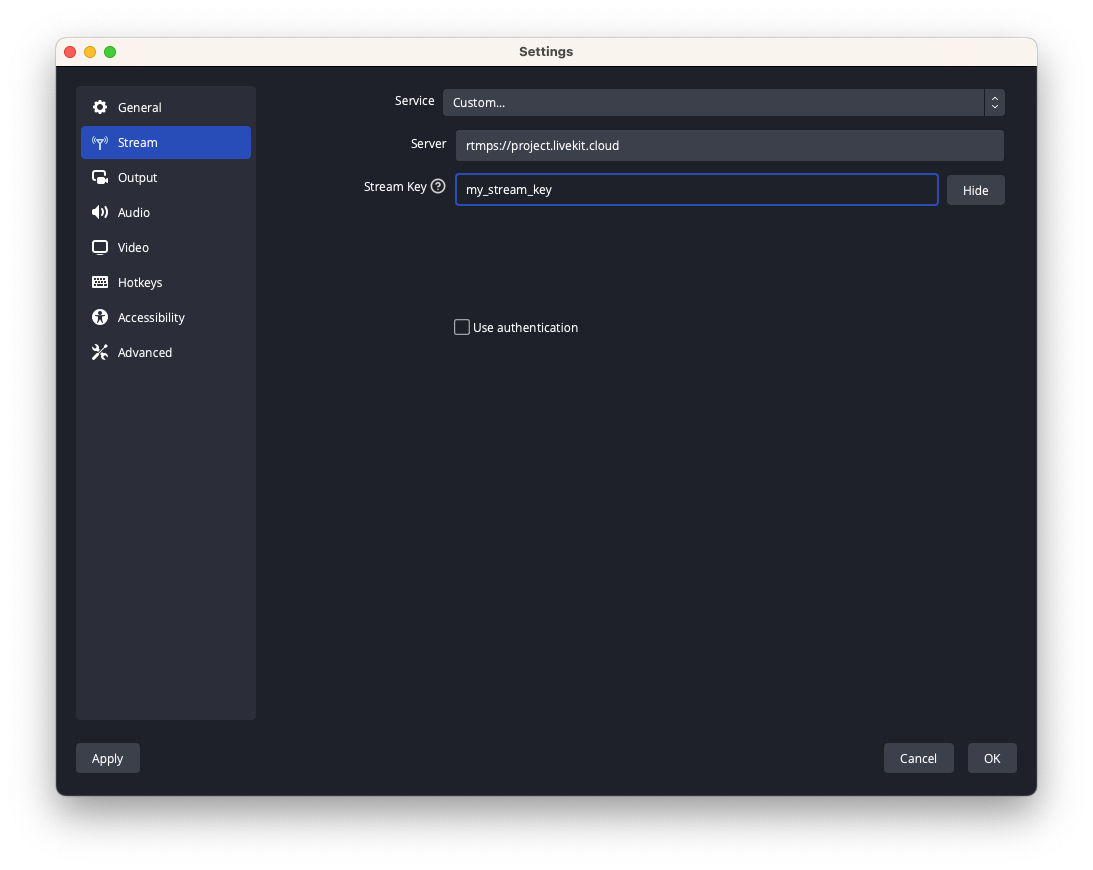
The [OBS Project](https://obsproject.com/) releases OBS Studio, a powerful cross platform broadcasting software that can be fully configured through a graphical user interface, and capable of sending complex video compositions to LiveKit WebRTC via Ingress. In order to configure OBS for LiveKit, in the main window, select the `Settings` option, and then the `Stream` tab. In the window, select the `Custom...` Service and enter the URL from the `StreamInfo` in the `Server` field, and the stream key in the `Stream Key` field.
## FFmpeg
[FFmpeg](https://ffmpeg.org/) is a powerful media processing command-line tool that can be used to stream media to LiveKit Ingress. The following command can be used for that purpose:
```shell
% ffmpeg -re -i -c:v libx254 -b:v 3M -preset veryfast -profile high -c:a libfdk_aac -b:a 128k -f flv "/"
```
For instance:
```shell
% ffmpeg -re -i my_file.mp4 -c:v libx264 -b:v 3M -preset veryfast -profile:v high -c:a libfdk_aac -b:a 128k -f flv rtmps://my-project.livekit.cloud/x/1234567890ab
```
Refer to the [FFmpeg documentation](https://ffmpeg.org/ffmpeg.html) for a list of the supported inputs, and how to use them.
## GStreamer
[GStreamer](https://gstreamer.freedesktop.org/) is multi platform multimedia framework that can be used either directly using command line tools provided as part of the distribution, or integrated in other applications using their API. GStreamer supports streaming media to LiveKit Ingress both over RTMP and WHIP.
For RTMP, the following sample command and pipeline definition can be used:
```shell
% gst-launch-1.0 flvmux name=mux ! rtmp2sink location="/" audiotestsrc wave=sine-table ! faac ! mux. videotestsrc is-live=true ! video/x-raw,width=1280,height=720 ! x264enc speed-preset=3 tune=zerolatency ! mux.
```
WHIP requires the following GStreamer plugins to be installed:
- nicesink
- webrtcbin
- whipsink
Some these plugins are distributed as part of [libnice](https://libnice.freedesktop.org) or the [Rust GStreamer plugins package](https://gitlab.freedesktop.org/gstreamer/gst-plugins-rs) and may not always be present. This can be verified using the `gst-inspect-1.0` command. LiveKit provides a Docker image based on Ubuntu that includes all the required GStreamer plugins at [livekit/gstreamer:1.22.8-prod-rs](https://hub.docker.com/layers/livekit/gstreamer/1.22.8-prod-rs/images/sha256-1a4d7ef428875550400430a57acf0759f1cb02771dbac2501b2d3fbe2f1ce74e?context=explore).
```shell
gst-launch-1.0 audiotestsrc wave=sine-table ! opusenc ! rtpopuspay ! 'application/x-rtp,media=audio,encoding-name=OPUS,payload=96,clock-rate=48000,encoding-params=(string)2' ! whip.sink_0 videotestsrc is-live=true ! video/x-raw,width=1280,height=720 ! x264enc speed-preset=3 tune=zerolatency ! rtph264pay ! 'application/x-rtp,media=video,encoding-name=H264,payload=97,clock-rate=90000' ! whip.sink_1 whipsink name=whip whip-endpoint="/"
```
These 2 sample command lines use the `audiotestsrc` and `videotestsrc` sources to generate test audio and video pattern. These can be replaced with other GStreamer sources to stream any media supported by GStreamer.
---
This document was rendered at 2026-06-07T11:37:07.641Z.
For the latest version of this document, see [https://docs.livekit.io/transport/media/ingress-egress/ingress/encoders.md](https://docs.livekit.io/transport/media/ingress-egress/ingress/encoders.md).
To explore all LiveKit documentation, see [llms.txt](https://docs.livekit.io/llms.txt).