{
TrackPublication? videoPub;
...
@override
Widget build(BuildContext context) {
// Audio tracks are automatically played.
var videoPub = this.videoPub;
if (videoPub != null) {
return VideoTrackRenderer(videoPub.track as VideoTrack);
} else {
return Container(
color: Colors.grey,
);
}
}
}
```
---
**Unity (WebGL)**:
Audio playback begins automatically after track subscription. Video playback requires an `HTMLVideoElement`:
```csharp
Room.TrackSubscribed += (track, publication, participant) =>
{
var element = track.Attach();
if (element is HTMLVideoElement video)
{
video.VideoReceived += tex =>
{
// Do things with tex
};
}
};
```
---
**C++**:
C++ apps consume decoded audio and video frames directly. Register frame callbacks with the publisher's identity and the published track name:
```cpp
room.setOnAudioFrameCallback("participant-identity", "microphone-track",
[](const livekit::AudioFrame& frame) {
// Process PCM samples from frame.
});
room.setOnVideoFrameCallback("participant-identity", "camera-track",
[](const livekit::VideoFrame& frame, std::int64_t timestamp_us) {
// Render or process the decoded video frame.
});
```
### Volume control
Audio tracks support a volume between 0 and 1.0, with a default value of 1.0. You can adjust the volume if necessary by setting the volume property on the track.
**JavaScript**:
```typescript
track.setVolume(0.5);
```
---
**Swift**:
```swift
track.volume = 0.5
```
---
**Android**:
```kotlin
track.setVolume(0.5)
```
---
**Flutter**:
```dart
track.setVolume(0.5)
```
## Active speaker identification
LiveKit can automatically detect participants who are actively speaking and send updates when their speaking status changes. Speaker updates are sent for both local and remote participants. These events fire on both Room and Participant objects, allowing you to identify active speakers in your UI.
**JavaScript**:
```typescript
room.on(RoomEvent.ActiveSpeakersChanged, (speakers: Participant[]) => {
// Speakers contain all of the current active speakers
});
participant.on(ParticipantEvent.IsSpeakingChanged, (speaking: boolean) => {
console.log(
`${participant.identity} is ${speaking ? 'now' : 'no longer'} speaking. audio level: ${participant.audioLevel}`,
);
});
```
---
**React**:
```tsx
export const MyComponent = ({ participant }) => {
const { isSpeaking } = useParticipant(participant);
return {isSpeaking ? 'speaking' : 'not speaking'}
;
};
```
---
**React Native**:
```tsx
export const MyComponent = ({ participant }) => {
const { isSpeaking } = useParticipant(participant);
return {isSpeaking ? 'speaking' : 'not speaking'};
};
```
---
**Swift**:
```swift
extension MyRoomHandler : RoomDelegate {
func didUpdateSpeakingParticipants(speakers: [Participant], room _: Room) {
// Do something with the active speakers
}
}
extension ParticipantHandler : ParticipantDelegate {
/// The isSpeaking status of the participant has changed
func didUpdateIsSpeaking(participant: Participant) {
print("\(participant.identity) is now speaking: \(participant.isSpeaking), audioLevel: \(participant.audioLevel)")
}
}
```
---
**Android**:
```kotlin
coroutineScope.launch {
room::activeSpeakers.flow.collect { currentActiveSpeakers ->
// Manage speaker changes across the room
}
}
coroutineScope.launch {
remoteParticipant::isSpeaking.flow.collect { isSpeaking ->
// Handle a certain participant speaker status change
}
}
```
---
**Flutter**:
```dart
class _ParticipantState extends State {
late final _listener = widget.participant.createListener()
@override
void initState() {
super.initState();
_listener.on((e) {
// Handle isSpeaking change
})
}
}
```
---
**Unity (WebGL)**:
```csharp
Room.ActiveSpeakersChanged += speakers =>
{
// Do something with the active speakers
};
participant.IsSpeakingChanged += speaking =>
{
Debug.Log($"{participant.Identity} is {(speaking ? "now" : "no longer")} speaking. Audio level {participant.AudioLevel}");
};
```
---
**C++**:
```cpp
class SpeakerDelegate : public livekit::RoomDelegate {
public:
void onActiveSpeakersChanged(livekit::Room&, const livekit::ActiveSpeakersChangedEvent& event) override {
for (const auto* speaker : event.speakers) {
std::cout << speaker->identity() << " is speaking\n";
}
}
};
SpeakerDelegate delegate;
room.setDelegate(&delegate);
```
## Selective subscription
Disable `autoSubscribe` to take manual control over which tracks the participant should subscribe to. This is appropriate for spatial applications and/or applications that require precise control over what each participant receives.
Both LiveKit's SDKs and server APIs have controls for selective subscription. Once configured, only explicitly subscribed tracks are delivered to the participant.
### From frontend
**JavaScript**:
```typescript
let room = await room.connect(url, token, {
autoSubscribe: false,
});
room.on(RoomEvent.TrackPublished, (publication, participant) => {
publication.setSubscribed(true);
});
// Also subscribe to tracks published before participant joined
room.remoteParticipants.forEach((participant) => {
participant.trackPublications.forEach((publication) => {
publication.setSubscribed(true);
});
});
```
---
**Swift**:
```swift
let connectOptions = ConnectOptions(
url: "ws://",
token: "",
autoSubscribe: false
)
let room = LiveKit.connect(options: connectOptions, delegate: self)
func didPublishRemoteTrack(publication: RemoteTrackPublication, participant: RemoteParticipant) {
publication.set(subscribed: true)
}
// Also subscribe to tracks published before participant joined
for participant in roomCtx.room.room.remoteParticipants {
for publication in participant.tracks {
publication.set(subscribed: true)
}
}
```
---
**Android**:
```kotlin
class ViewModel(...) {
suspend fun connect() {
val room = LiveKit.create(appContext = application)
room.connect(
url = url,
token = token,
options = ConnectOptions(autoSubscribe = false)
)
// Also subscribe to tracks published before participant joined
for (participant in room.remoteParticipants.values) {
for (publication in participant.trackPublications.values) {
val remotePub = publication as RemoteTrackPublication
remotePub.setSubscribed(true)
}
}
viewModelScope.launch {
room.events.collect { event ->
if(event is RoomEvent.TrackPublished) {
val remotePub = event.publication as RemoteTrackPublication
remotePub.setSubscribed(true)
}
}
}
}
}
```
---
**Flutter**:
```dart
const roomOptions = RoomOptions(
adaptiveStream: true,
dynacast: true);
const connectOptions = ConnectOptions(
autoSubscribe: false);
final room = Room();
await room.connect(url, token, connectOptions: connectOptions, roomOptions: roomOptions);
// If necessary, we can listen to room events here
final listener = room.createListener();
class RoomHandler {
Room room;
late EventsListener _listener;
RoomHandler(this.room) {
_listener = room.createListener();
_listener.on((e) {
unawaited(e.publication.subscribe());
});
// Also subscribe to tracks published before participant joined
for (RemoteParticipant participant in room.remoteParticipants.values) {
for (RemoteTrackPublication publication
in participant.trackPublications.values) {
unawaited(publication.subscribe());
}
}
}
}
```
---
**Python**:
```python
@room.on("track_published")
def on_track_published(
publication: rtc.RemoteTrackPublication, participant: rtc.RemoteParticipant
):
publication.set_subscribed(True)
await room.connect(url, token, rtc.RoomOptions(auto_subscribe=False))
# Also subscribe to tracks published before participant joined
for p in room.remote_participants.values():
for pub in p.track_publications.values():
pub.set_subscribed(True)
```
---
**Unity (WebGL)**:
```csharp
yield return room.Connect(url, token, new RoomConnectOptions()
{
AutoSubscribe = false
});
room.TrackPublished += (publication, participant) =>
{
publication.SetSubscribed(true);
};
```
---
**C++**:
```cpp
class SubscriptionDelegate : public livekit::RoomDelegate {
public:
void onTrackPublished(livekit::Room&, const livekit::TrackPublishedEvent& event) override {
if (event.publication != nullptr) {
event.publication->setSubscribed(true);
}
}
};
livekit::RoomOptions options;
options.auto_subscribe = false;
livekit::Room room;
SubscriptionDelegate delegate;
room.setDelegate(&delegate);
room.connect(ws_url, token, options);
// Also subscribe to tracks published before participant joined.
for (const auto& weak_participant : room.remoteParticipants()) {
if (auto participant = weak_participant.lock()) {
for (const auto& [sid, publication] : participant->trackPublications()) {
publication->setSubscribed(true);
}
}
else
{
std::cerr << "Failed to get remote participant\n";
return;
}
}
```
### From server API
These controls are also available with the server APIs.
**Node.js**:
```typescript
import { RoomServiceClient } from 'livekit-server-sdk';
const roomServiceClient = new RoomServiceClient('myhost', 'api-key', 'my secret');
// Subscribe to new track
roomServiceClient.updateSubscriptions('myroom', 'receiving-participant-identity', ['TR_TRACKID'], true);
// Unsubscribe from existing track
roomServiceClient.updateSubscriptions('myroom', 'receiving-participant-identity', ['TR_TRACKID'], false);
```
---
**Go**:
```go
import (
lksdk "github.com/livekit/server-sdk-go"
)
roomServiceClient := lksdk.NewRoomServiceClient(host, apiKey, apiSecret)
_, err := roomServiceClient.UpdateSubscriptions(context.Background(), &livekit.UpdateSubscriptionsRequest{
Room: "myroom",
Identity: "receiving-participant-identity",
TrackSids: []string{"TR_TRACKID"},
Subscribe: true
})
```
## Adaptive stream
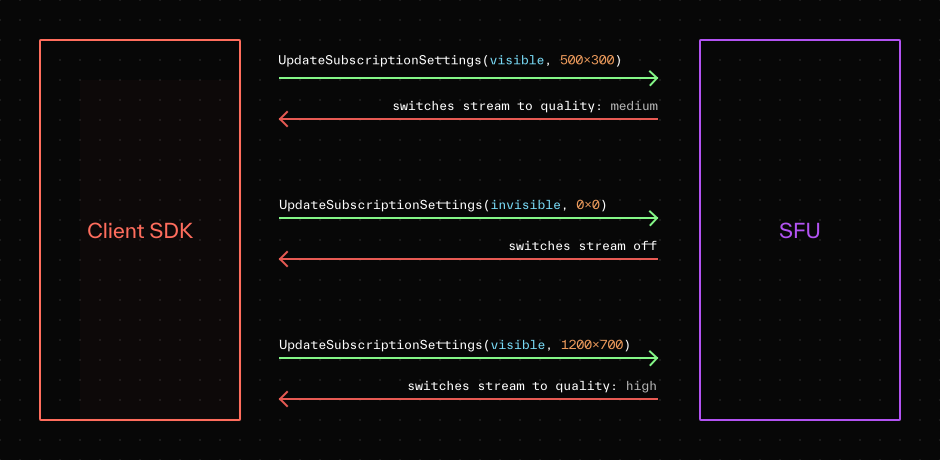
Video elements in your app can vary in size, and some might be hidden. Fetching high-resolution video only to render it in a 150×150 element wastes bandwidth.
Adaptive stream lets you build dynamic video applications without worrying about how interface design or user interaction might impact video quality. It fetches the minimum bits necessary for high-quality rendering and scales to very large sessions.
When adaptive stream is enabled, the LiveKit SDK monitors both size and visibility of the UI elements that the tracks are attached to. It then automatically coordinates with the server to send back the simulcast layer that best matches the UI element. If the element is hidden, the SDK automatically pauses the associated track on the server side until the element becomes visible.
> ℹ️ **Note**
>
> With JS SDK, you must use `Track.attach()` in order for adaptive stream to be effective.
## Enabling/disabling tracks
Implementations seeking fine-grained control can enable or disable tracks at their discretion. This could be used to implement subscriber-side mute (for example, muting a publisher in the room, but only for the current user).
When disabled, the participant doesn't receive any new data for that track. If a disabled track is subsequently enabled, new data is received again.
The `disable` action is useful when optimizing for a participant's bandwidth consumption. For example, if a particular user's video track is offscreen, disabling this track stops the LiveKit server from sending bytes until the track's data is needed again. Adaptive stream handles this automatically.
**JavaScript**:
```typescript
import { connect, RoomEvent } from 'livekit-client';
room.on(RoomEvent.TrackSubscribed, handleTrackSubscribed);
function handleTrackSubscribed(
track: RemoteTrack,
publication: RemoteTrackPublication,
participant: RemoteParticipant,
) {
publication.setEnabled(false);
}
```
---
**Swift**:
```swift
let room = LiveKit.connect(options: ConnectOptions(url: url, token: token), delegate: self)
...
func room(_ room: Room,
participant: RemoteParticipant,
didSubscribe publication: RemoteTrackPublication,
track: Track) {
publication.setEnabled(false)
}
```
---
**Android**:
```kotlin
coroutineScope.launch {
room.events.collect { event ->
when(event) {
is RoomEvent.TrackSubscribed -> {
event.publication.setEnabled(false)
}
else -> {}
}
}
}
```
---
**Flutter**:
```dart
void disableTrack(RemoteTrackPublication publication) {
publication.enabled = false;
}
```
---
**Unity (WebGL)**:
```csharp
room.TrackSubscribed += (track, publication, participant) =>
{
publication.SetEnabled(false);
};
```
> ℹ️ **Subscribe and unsubscribe vs. enable and disable**
>
> subscribe and unsubscribe differ from enable and disable. A track must be subscribed to and enabled for data to be received by the participant. If a track isn't subscribed to, is unsubscribed from, or is disabled, the participant performing these actions doesn't receive that track's data.
>
> The difference between these two actions is negotiation. Subscribing requires a negotiation handshake with the LiveKit server, while enable and disable don't. Depending on the use case, this can make enable/disable more efficient, especially when a track might be turned on or off frequently.
## Simulcast controls
If a video track has simulcast enabled, a receiving participant may want to manually specify the maximum receivable quality. This reduces quality and bandwidth for the target track. This might come in handy, for instance, when an application's user interface is displaying a small thumbnail for a particular user's video track.
**JavaScript**:
```typescript
import { connect, RoomEvent } from 'livekit-client';
connect('ws://your_host', token, {
audio: true,
video: true,
}).then((room) => {
room.on(RoomEvent.TrackSubscribed, handleTrackSubscribed);
});
function handleTrackSubscribed(
track: RemoteTrack,
publication: RemoteTrackPublication,
participant: RemoteParticipant,
) {
if (track.kind === Track.Kind.Video) {
publication.setVideoQuality(VideoQuality.LOW);
}
}
```
---
**Swift**:
```swift
let room = LiveKit.connect(url, token, delegate: self)
...
func room(_ room: Room,
participant: RemoteParticipant,
didSubscribe publication: RemoteTrackPublication,
track: Track) {
if let _ = track as? VideoTrack {
publication.setVideoQuality(.low)
}
}
```
---
**Android**:
```kotlin
coroutineScope.launch {
room.events.collect { event ->
when(event) {
is RoomEvent.TrackSubscribed -> {
event.publication.setVideoQuality(VideoQuality.LOW)
}
else -> {}
}
}
}
```
---
**Flutter**:
```dart
var listener = room.createListener();
listener.on((e) {
if (e.publication.kind == TrackType.VIDEO) {
e.publication.videoQuality = VideoQuality.LOW;
}
})
```
---
**Unity (WebGL)**:
```csharp
room.TrackSubscribed += (track, publication, participant) =>
{
if(publication.Kind == TrackKind.Video)
publication.SetVideoQuality(VideoQuality.LOW);
};
```
---
This document was rendered at 2026-06-07T11:36:46.224Z.
For the latest version of this document, see [https://docs.livekit.io/transport/media/subscribe.md](https://docs.livekit.io/transport/media/subscribe.md).
To explore all LiveKit documentation, see [llms.txt](https://docs.livekit.io/llms.txt).