The sandbox token server is for development and testing only. It's not suitable for production, since any frontend app can request a token with any permissions and no restrictions.
Overview
LiveKit Cloud's sandbox token server generates tokens for you with no backend code required. When you're ready for production, migrate to endpoint token generation.
Enable the token server
Open your project's Settings page in LiveKit Cloud.
Find the Token server toggle and switch it on. LiveKit Cloud automatically creates a token server for your project.
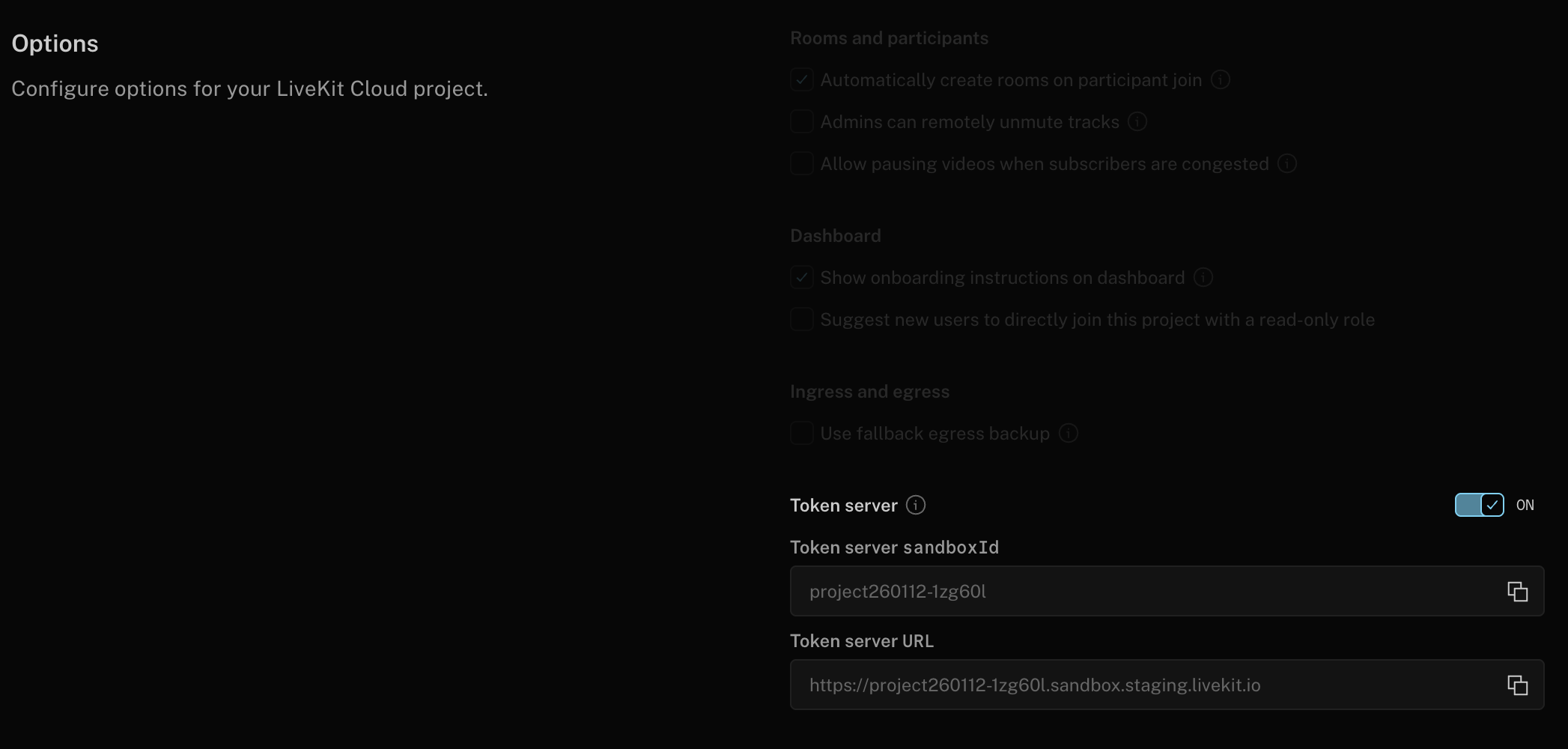
- Copy the sandbox ID displayed below the toggle. Use this value in your frontend code.
Use a sandbox-based TokenSource
Configure a sandbox token server TokenSource in your application with your sandbox ID:
The sandbox token server accepts agent_name in token requests. When using Session APIs, you can provide the agent name at runtime, and it's automatically included in token requests. See the Authentication overview for more information.
import { Room, TokenSource } from 'livekit-client';// Create the TokenSourceconst tokenSource = TokenSource.sandboxTokenServer("<your sandbox token server id>");// Fetch a token (cached and automatically refreshed as needed)// For agent applications, include agentName in the fetch optionsconst { serverUrl, participantToken } = await tokenSource.fetch({roomName: "room name to join",agentName: "my-agent-name" // Optional: for agent dispatch});// Use the generated token to connect to a roomconst room = new Room();room.connect(serverUrl, participantToken);
import { TokenSource } from 'livekit-client';import { useSession, SessionProvider } from '@livekit/components-react';// Create the TokenSourceconst tokenSource = TokenSource.sandboxTokenServer("<your sandbox token server id>");export const MyPage = () => {const session = useSession(tokenSource, {roomName: "room name to join",agentName: "my-agent-name" // Optional: for agent dispatch});// Start the session when the component mounts, and end the session when the component unmountsuseEffect(() => {session.start();return () => {session.end();};}, []);return (<SessionProvider session={session}><MyComponent /></SessionProvider>)}export const MyComponent = () => {// Access the session available via the context to build your app// ie, show a list of all camera tracks:const cameraTracks = useTracks([Track.Source.Camera], {onlySubscribed: true});return (<>{cameraTracks.map((trackReference) => {return (<VideoTrack {...trackReference} />)})}</>)}
import LiveKitComponents@mainstruct SessionApp: App {let session = Session.withAgent("my-agent", tokenSource: SandboxTokenSource(id: "<your sandbox token server id>"))var body: some Scene {WindowGroup {ContentView().environmentObject(session).alert(session.error?.localizedDescription ?? "Error", isPresented: .constant(session.error != nil)) {Button(action: session.dismissError) { Text("OK") }}.alert(session.agent.error?.localizedDescription ?? "Error", isPresented: .constant(session.agent.error != nil)) {AsyncButton(action: session.end) { Text("OK") }}}}}struct ContentView: View {@EnvironmentObject var session: Sessionvar body: some View {if session.isConnected {AsyncButton(action: session.end) {Text("Disconnect")}Text(String(describing: session.agent.agentState))} else {AsyncButton(action: session.start) {Text("Connect")}}}}
val tokenSource = remember {TokenSource.fromSandboxTokenServer("<your sandbox token server id>").cached()}val session = rememberSession(tokenSource = tokenSource,options = SessionOptions(tokenRequestOptions = TokenRequestOptions(agentName = "my-agent-name") // Optional: for agent dispatch))Column {SessionScope(session = session) { session ->val coroutineScope = rememberCoroutineScope()var shouldConnect by remember { mutableStateOf(false) }LaunchedEffect(shouldConnect) {if (shouldConnect) {val result = session.start()// Handle if the session fails to connect.if (result.isFailure) {Toast.makeText(context, "Error connecting to the session.", Toast.LENGTH_SHORT).show()shouldConnect = false}} else {session.end()}}Button(onClick = { shouldConnect = !shouldConnect }) {Text(if (shouldConnect) {"Disconnect"} else {"Connect"})}}}
import 'package:livekit_client/livekit_client.dart' as sdk;final tokenSource = sdk.SandboxTokenSource(sandboxId: "<your sandbox token server id>");final session = sdk.Session.withAgent("my-agent-name", tokenSource: tokenSource);/* ... */await session.start();// Use session to further build out your application.
import { TokenSource } from 'livekit-client';import { useSession, SessionProvider } from '@livekit/components-react';// Create the TokenSourceconst tokenSource = TokenSource.sandboxTokenServer("<your sandbox token server id>");export const MyPage = () => {const session = useSession(tokenSource, {roomName: "room name to join",agentName: "my-agent-name" // Optional: for agent dispatch});// Start the session when the component mounts, and end the session when the component unmountsuseEffect(() => {session.start();return () => {session.end();};}, []);return (<SessionProvider session={session}>{/* render the rest of your application here */}</SessionProvider>)}