Overview
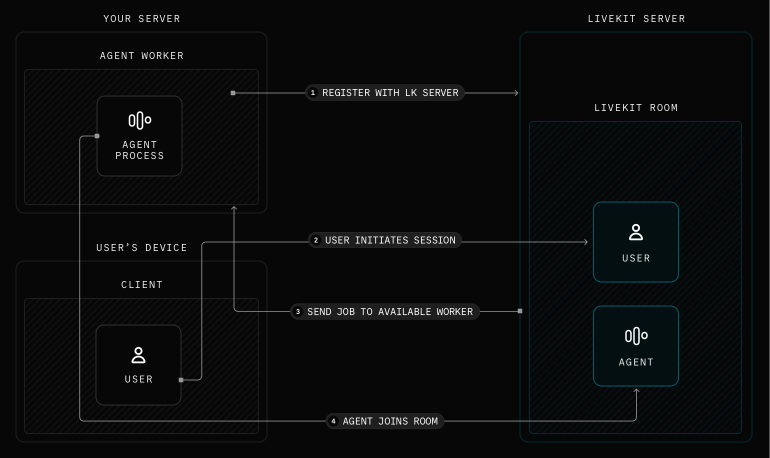
When a user connects to a room, LiveKit server dispatches a request to available agent servers. The first available agent server accepts the job and starts the agent session. An overview of the server lifecycle is as follows:
- Agent server registration: Your agent code registers itself as an "agent server" with LiveKit server, then waits on standby for requests.
- Job request: When a user connects to a room, LiveKit server sends a request to an available agent server. An agent server accepts and starts a new process to handle the job. This is also known as agent dispatch.
- Job: The job initiated by your entrypoint function. This is the bulk of the code and logic you write. To learn more, see Job lifecycle.
- LiveKit session close: By default, a room is automatically closed when the last non-agent participant leaves. Any remaining agents disconnect. You can also end the session manually.
The following diagram shows the agent server lifecycle:
Server features
Some additional features of agent servers include the following:
- Agent servers automatically exchange availability and capacity information with LiveKit server, enabling load balancing of incoming requests.
- Each agent server can run multiple jobs simultaneously, running each in its own process for isolation. If one crashes, it doesn't affect others running on the same agent server.
- When you deploy updates, agent servers gracefully drain active LiveKit sessions before shutting down, ensuring sessions aren't interrupted.