Overview
LiveKit Ingress lets you import video from another source into a LiveKit room. While WebRTC is a versatile and scalable transport protocol for both media ingestion and delivery, some applications require integrating with existing workflows or equipment that don't support WebRTC. LiveKit Ingress makes it easy to publish videos from OBS Studio or a dedicated hardware device.
LiveKit Ingress can automatically transcode the source media to ensure compatibility with LiveKit clients. It can publish multiple layers with Simulcast. The parameters of the different video layers can be defined at ingress creation time.
For LiveKit Cloud customers, ingress is ready to use with your project without additional configuration. When self-hosting LiveKit, ingress is deployed as a separate service.
Supported sources
LiveKit Ingress supports the following input sources:
- RTMP/RTMPS
- WHIP
- Media files fetched from any HTTP server. The following media formats are supported:
- HTTP Live Streaming (HLS)
- ISO MPEG-4 (MP4)
- Apple Quicktime (MOV)
- Matroska (MKV/WEBM)
- OGG audio
- MP3 audio
- M4A audio
- Media served by a SRT server
Workflow & architecture
This section explains the LiveKit Ingress architecture and workflow.
Service architecture
LiveKit Ingress exposes public RTMP and WHIP endpoints streamers can connect to. On initial handshake, the Ingress service validates the incoming request and retrieves the corresponding ingress metadata, including what LiveKit room the stream belongs to. The ingress server then sets up a GStreamer-based media processing pipeline to transcode the incoming media to a format compatible with LiveKit WebRTC clients, publishing the resulting media to the LiveKit room.
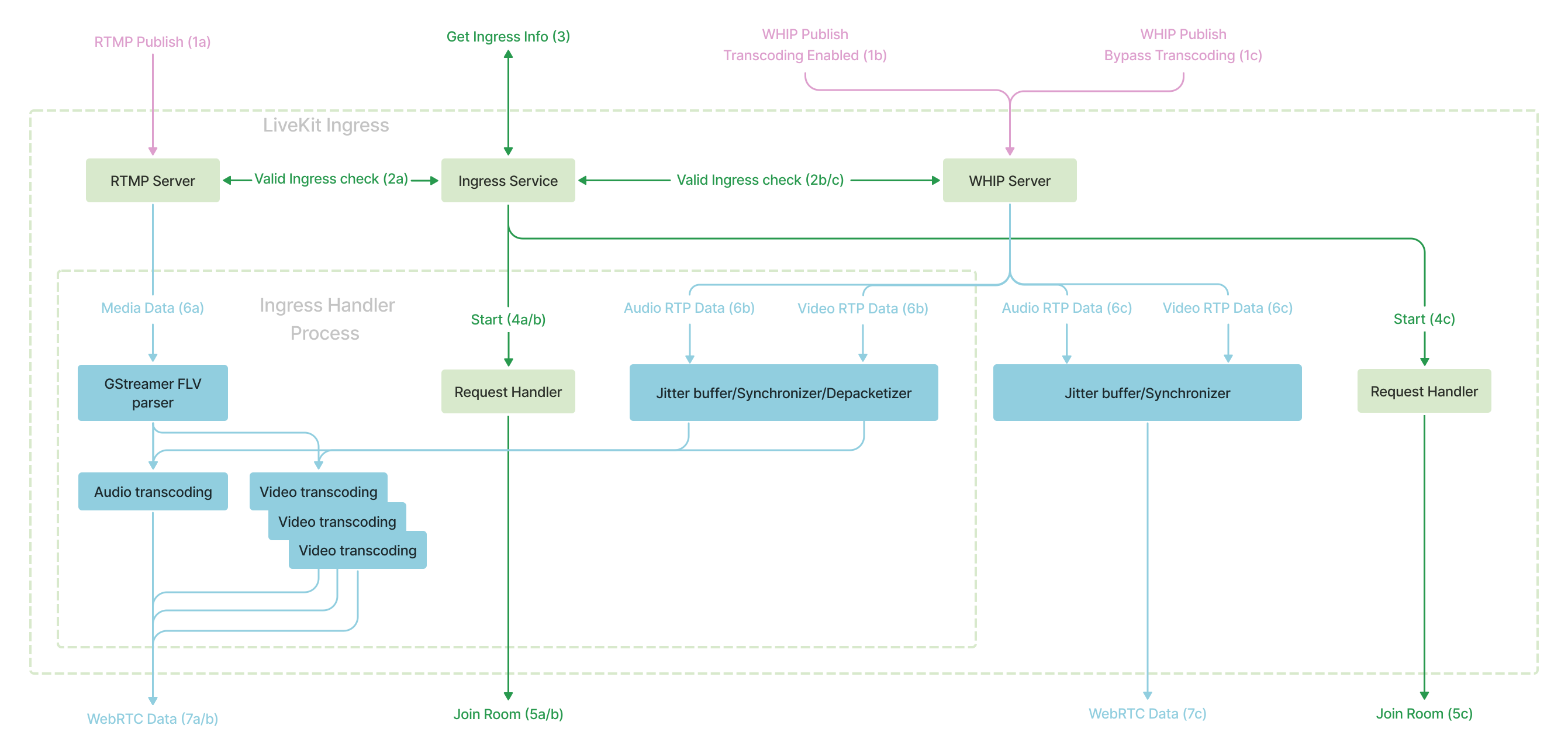
Workflow
There are two main workflows for LiveKit Ingress:
- Pushing media to LiveKit Ingress using RTMP or WHIP.
- Pulling media from a HTTP or SRT server.
RTMP/WHIP
A typical push ingress goes like this:
- Your app creates an Ingress with
CreateIngressAPI, which returns a URL and stream key of the ingress. - Your user copies and pastes the URL and key into your streaming workflow.
- Your user starts their stream.
- The Ingress service starts transcoding their stream, or forwards media unchanged if transcoding is disabled.
- The Ingress Service joins the LiveKit room and publishes the media for other participants.
- When the stream source disconnects from the Ingress service, the Ingress service participant leaves the room.
- The ingress remains valid, in a disconnected state, allowing it to be reused with the same stream key.
URL input
When pulling media from a HTTP or SRT server, ingress has a slightly different lifecycle: it starts immediately after calling CreateIngress.
- Your app creates an ingress with
CreateIngressAPI. - The Ingress service starts fetching the file or media and transcoding it.
- The Ingress service joins the LiveKit room and publishes the transcoded media for other participants.
- When the media is completely consumed, or if
DeleteIngressis called, the Ingress service participant leaves the room.
Ingress components
Configure ingress sources and transcoding settings for your LiveKit applications.
| Component | Description | Use cases |
|---|---|---|
| Encoder configuration | Configure external streaming software like OBS Studio, FFmpeg, and GStreamer to send media to LiveKit Ingress using RTMP or WHIP. | Setting up OBS Studio for streaming, configuring FFmpeg for media streaming, and integrating GStreamer pipelines with LiveKit. |
| Transcoding configuration | Configure video and audio encoding settings for LiveKit Ingress, including presets and custom encoding options for transcoding incoming media. | Customizing video quality and simulcast layers, configuring audio encoding settings, and enabling transcoding for WHIP sessions. |
In this section
Learn how to configure and use LiveKit Ingress.