Overview
LiveKit Egress gives you a powerful and consistent set of APIs to export any room or individual tracks from a LiveKit session. It supports recording to an MP4 file or HLS segments, as well as exporting to live streaming services like YouTube Live, Twitch, and Facebook via RTMP.
For LiveKit Cloud customers, egress is available for your project without any additional configuration. If you're self-hosting LiveKit, egress must be deployed separately.
Egress types
The Egress service supports multiple types of exports for different use cases. The table below lists the different egress components and their descriptions.
| Egress type | Description | Use cases |
|---|---|---|
| RoomComposite egress | Export an entire room's video and/or audio using a web layout rendered by Chrome. Tied to a room's lifecycle and stops automatically when the room ends. Composition templates are customizable web pages that can be hosted anywhere. | Recording meetings for team members to watch later, capturing all participants and interactions in a room. |
| Web egress | Record and export any web page. Similar to room composite egress, but isn't tied to a LiveKit room and can record non-LiveKit content. | Restreaming content from a third-party source to YouTube and Twitch, recording external web applications. |
| Participant egress | Export a participant's video and audio together. A newer API designed to be easier to use than Track Composite Egress. | Recording individual participants in online classes, capturing a specific speaker's video and audio. |
| TrackComposite egress | Sync and export one audio and one video track together. Transcoding and multiplexing happen automatically. | Exporting audio and video from multiple cameras during production for post-production use, combining specific tracks. |
| Track egress | Export individual tracks directly without transcoding. Video tracks are exported as-is. | Streaming audio tracks to captioning services via WebSocket, exporting raw track data for processing. |
| Auto egress | Automatically start recording when a room is created. Configure the egress field in CreateRoom to record the room as a composite and each published track separately. | Recording all rooms automatically, capturing every track published to a room without manual intervention. |
Service architecture
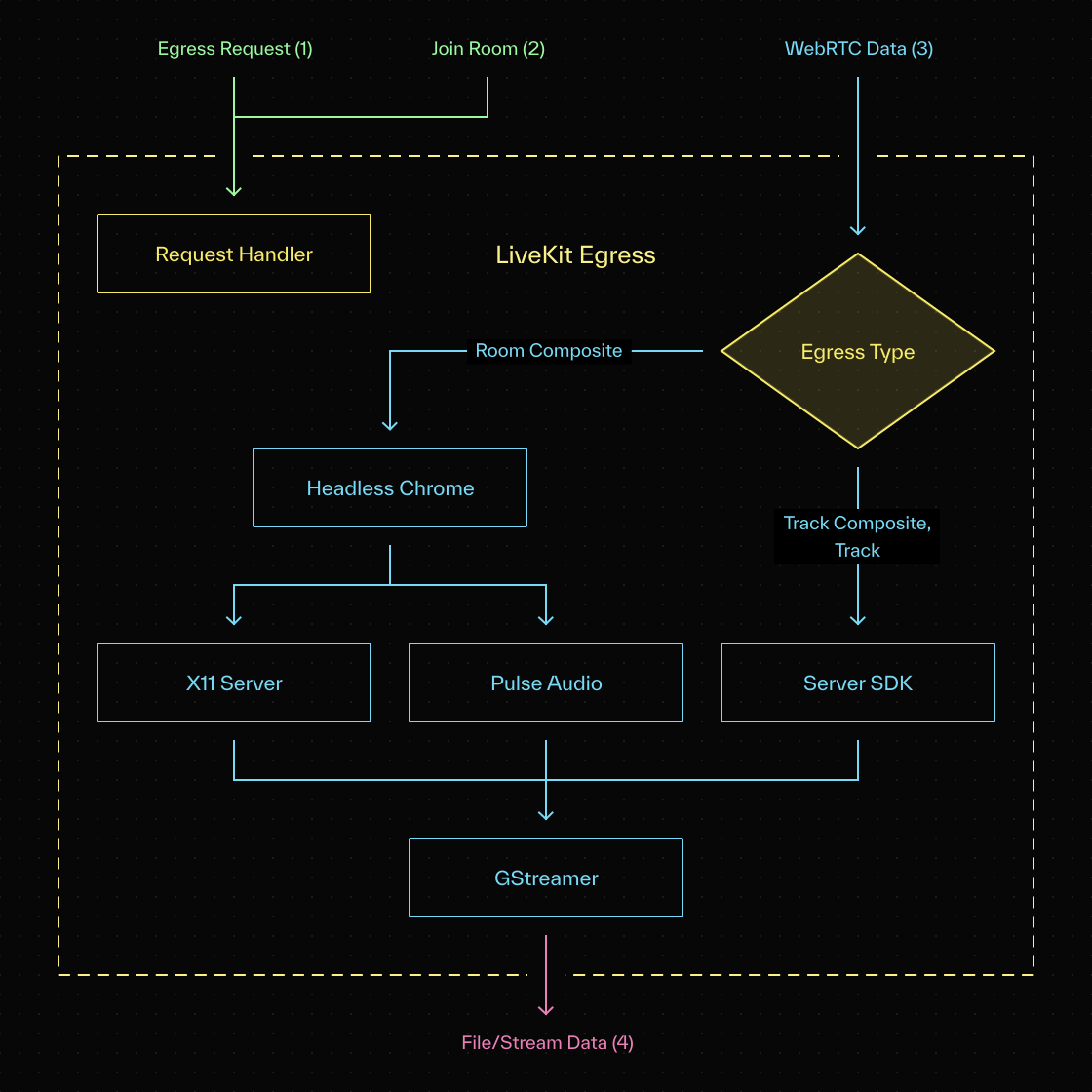
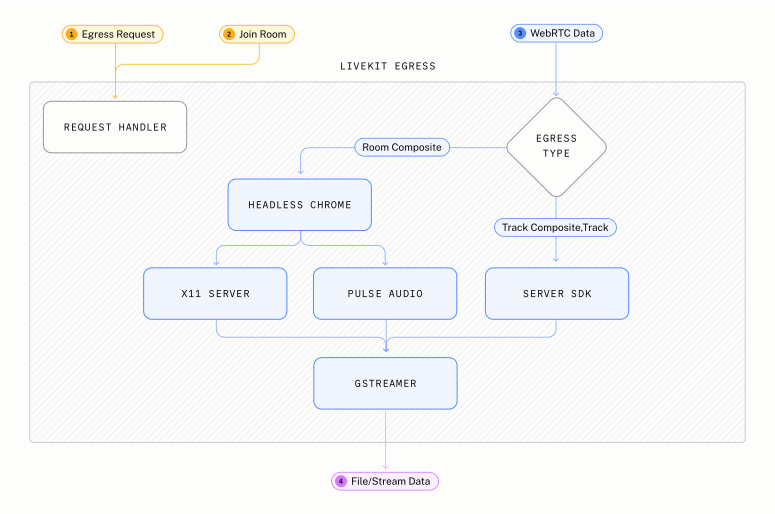
Depending on your request type, the Egress service either launches a web template in Chrome and connects to the room (for example, for room composite requests), or it uses the SDK directly (for track and track composite requests). It uses GStreamer to encode, and can output to a file or to one or more streams.
Additional resources
The following topics provide more in-depth information about the various egress types.
Room composite and web egress
Composite recording using a web-based recorder. Export an entire room or any web page.
Participant and track composite egress
Record a participant's audio and video tracks. Use TrackComposite egress for fine-grained control over tracks.
Track egress
Export a single track without transcoding.
Auto egress
Automatically start recording when a room is created.
Output and stream types
Sync and export one audio and one video track together. Transcoding and multiplexing happen automatically.